Laptop CareGuide
Laptop Posture: How to Use a Laptop Without Wrecking Your Neck
In 2009 this site ran a joke post cataloguing the positions people contort themselves into with a laptop. The joke has aged into a genuine problem: a laptop's screen and keyboard are attached, so you can have your head up or your hands comfortable, but never both without help.
Quick answer
Put the laptop on a stand or a stack of books so the top of the screen is at eye level, then use a separate keyboard and mouse so your elbows stay at about 90 degrees and your wrists stay flat. When you cannot do that, change position every 20 to 30 minutes and keep sessions short.
On this page
Why the laptop position hurts
Look down at a laptop on a desk and your head tilts forward by 20 to 45 degrees. The head weighs about 5 kg upright; tilted forward, the load on the neck muscles and upper spine rises several times over, and holding that for hours is what produces the tightness across the shoulders and the headache at the end of the day. Raise the laptop so the screen is right and the keyboard rises with it, forcing your shoulders up and your wrists to bend. Every laptop position is a trade between these two, which is why the answer is almost always to separate them.
The desk setup
Raise the screen
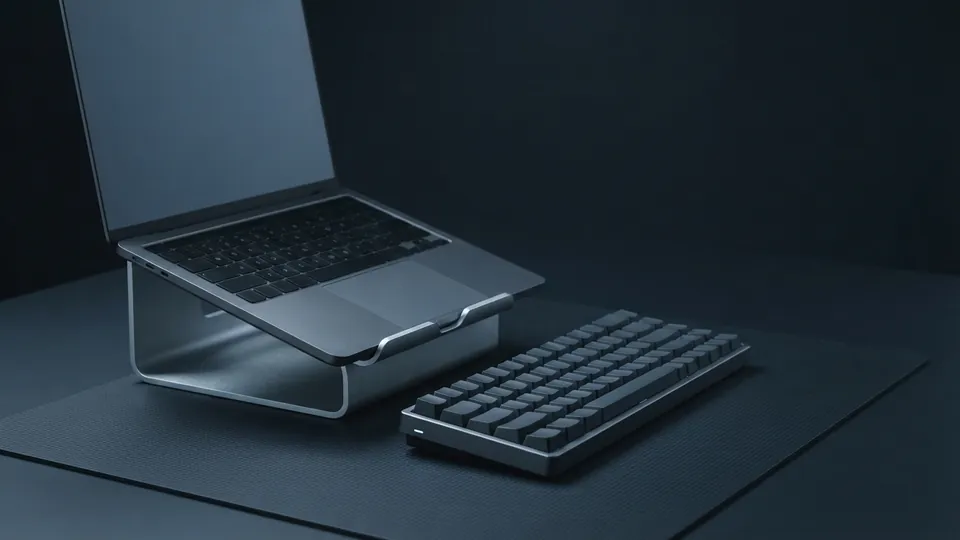
Use a laptop stand or a stable stack of books until the top edge of the screen is level with your eyes when you sit upright. Tilt the screen slightly back so you look at it square on.
Add a keyboard and mouse
Any external keyboard and mouse will do. Place the keyboard so your elbows rest at roughly 90 degrees and your forearms are level or angled slightly down toward the keys; wrists should be straight, not bent up.
Sit back
Use the chair's backrest. Feet flat on the floor or a footrest, knees at about hip height. Sitting on the front edge of the chair with a raised laptop undoes most of the benefit.
Check the distance
The screen should be about an arm's length away. If you find yourself leaning in, increase the text size in the operating system rather than moving closer.
| Setup | Neck | Wrists and shoulders | Verdict |
|---|---|---|---|
| Laptop flat on desk | Poor | OK | Fine for under an hour |
| Laptop on stand, no keyboard | Good | Poor | Worse than flat for typing |
| Laptop on stand + external keyboard and mouse | Good | Good | The right answer for daily use |
| Laptop on lap, sofa | Poor | OK | Short sessions only; use a tray |
| Laptop in bed | Poor | Poor | Reading only; do not type for long |
| Standing desk with stand | Good | Good | Good if you alternate with sitting |
Sofa, bed, train: making the best of it
Some laptop use happens away from any desk, and the aim there is to limit harm rather than perfect anything. On a sofa, a lap tray with a cushioned underside raises the laptop and keeps the hot intake off your legs. In bed, prop yourself upright against the headboard with pillows behind your lower back, put the laptop on a tray or a firm pillow, and keep it to reading rather than long typing. On a train or plane, lower the tray table, sit as far back in the seat as you can, and accept that it is a temporary position. In all of these, the most useful habit is the timer: every 20 to 30 minutes, stand, roll your shoulders, and look at something far away.
The two-minute reset
- Chin tucks: sitting tall, draw your chin straight back as if making a double chin, hold for five seconds, repeat five times.
- Shoulder rolls: ten slow circles backward.
- Doorway stretch: forearms on a door frame, step through gently until you feel the chest open, hold for twenty seconds.
- Wrist flexor stretch: arm straight, palm up, gently pull the fingers back with the other hand for fifteen seconds each side.
See the other care guides for laptops for cleaning, heat and batteries; a desk setup also makes it easier to follow the battery habits that slow wear. Keeping the underside off your lap also keeps it cool, as the laptop heat and radiation facts show, and a lighter machine is easier to set up well, which the laptop size and weight guide weighs up. A TV or monitor also makes a good raised screen: connecting a laptop to a TV takes one cable.
Common questions
What height should a laptop screen be?
Top edge of the screen at or just below eye level when you sit upright, about an arm's length away.
Is a laptop stand worth it?
Only together with a separate keyboard and mouse. A stand alone fixes your neck and ruins your wrists.
Can I use a laptop on my lap safely?
For short periods with a tray between you and the machine. It blocks the vents and tilts your head down, so keep sessions short.
Which is better, a laptop stand or a monitor?
A monitor is better for a fixed desk because it can be positioned independently. A stand is the portable compromise and works well with a good keyboard.
How often should I take a break?
Change position every 20 to 30 minutes, even briefly. Movement matters more than any single perfect posture.
Sources
- OSHA: Computer Workstations eTool, Positions: neutral working postures at a computer.
- OSHA: Computer Workstations eTool, Monitors: screen height and viewing distance to avoid neck strain.
- OSHA: Computer Workstations eTool, Keyboards: keyboard placement for relaxed arms and straight wrists.